---
title: How do I import location and room lists?
description: We'll show you step by step how to import your rooms and locations. Take a look at the video tutorial at the end.
---
[Skip to content](https://support.seventhings.com/migration/en/how-do-i-import-location-and-room-lists#main-content)
- [English](https://support.seventhings.com/migration/en/how-do-i-import-location-and-room-lists)
- [Deutsch](https://support.seventhings.com/migration/wie-importiere-ich-standort-und-raumlisten)
English
Show submenu for translations
![seventhings.png\]](https://support.seventhings.com/hs-fs/hubfs/seventhings.png?height=30&name=seventhings.png)
- [Default HubSpot Blog](https://blog.seventhings.com/de)
Open main navigation
Close main navigation
- [Default HubSpot Blog](https://blog.seventhings.com/de)
- - [English](https://support.seventhings.com/migration/en/how-do-i-import-location-and-room-lists)
- [Deutsch](https://support.seventhings.com/migration/wie-importiere-ich-standort-und-raumlisten)
English
Show submenu for translations
- www.seventhings.com/en
www.seventhings.com/en
Need some help?
- There are no suggestions because the search field is empty.
1. [Support & Knowledge Base](https://support.seventhings.com/migration/en?hsLang=en)
2. [Import & Export](https://support.seventhings.com/migration/en/import-export?hsLang=en)
3. [Imports Locations](https://support.seventhings.com/migration/en/import-export?hsLang=en#imports-locations)
# How do I import location and room lists?
## We'll show you step by step how to import your rooms and locations. Take a look at the video tutorial at the end.
---
If you already have an existing room book, you can easily import it into seventhings. That's how it works:
Watch our tutorial video to get a closer look on importing room lists:
1\. Click on **Locations** in the **Import Export** tab
2\. Click on **File Format**
3\. If you haven't already done so, create your own template by clicking on **Create**. If you've already created a template, **skip to step 9**.
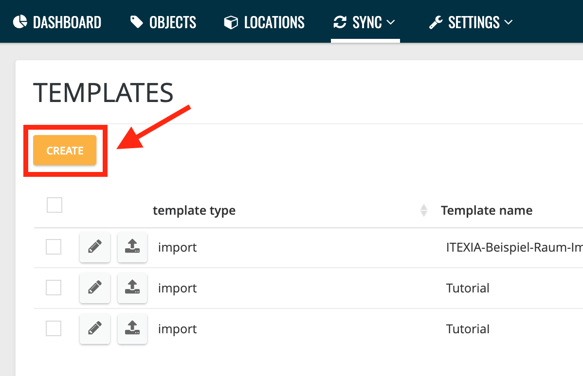
We have described the creation of a template in detail [**here**](https://support.seventhings.com/en/how-do-i-create-an-import-template-for-location-and-room-lists?hsLang=en).
4\. Click **Import**
5\. **Drag** a .csv file with your room list into the field provided
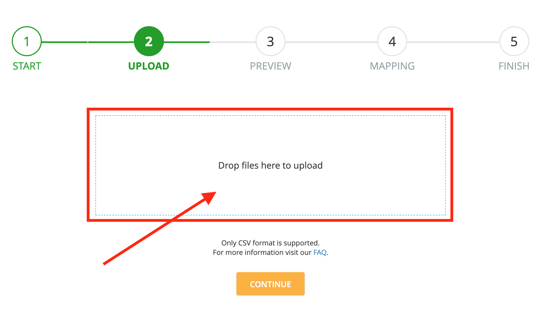
6\. Click **Continue** in the preview
7\. In the mapping, **drag** the seventhings fields to the corresponding fields in the import file, choose a **primary key** and give the template a **name**.
We explain exactly how the **mapping** works [**here**](https://support.itexia.com/en/how-do-i-create-an-import-template-for-location-and-room-lists?hsLang=en) in the article on creating the template.
8\. Click on **Finish** - now you can record your data directly on the template.
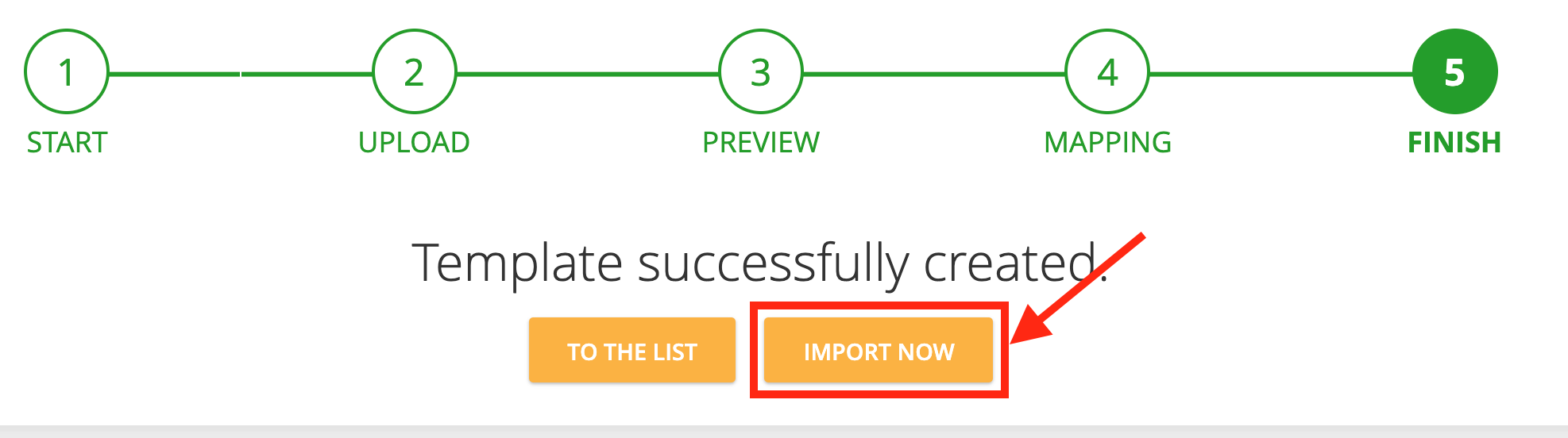
9\. Click **Import Now**.
If you have already created a template, click on the **upload** **icon** next to the template.
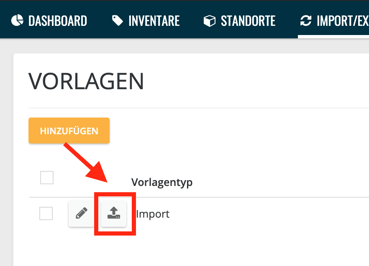
Make sure that the template and the import file have the same column names.
10\. Drag your corresponding **room list** into the field provided and click continue
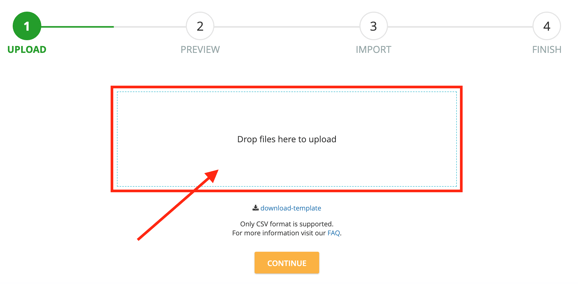
11. Have a look at the preview and click on **Finish**
- [FAQ's](https://support.seventhings.com/migration/en/faqs?hsLang=en#main-content)
- [App](https://support.seventhings.com/migration/en/faqs?hsLang=en#app)
- [Labels](https://support.seventhings.com/migration/en/faqs?hsLang=en#labels)
- [Web App](https://support.seventhings.com/migration/en/faqs?hsLang=en#web-app)
- [Configuration of data fields](https://support.seventhings.com/migration/en/faqs?hsLang=en#configuration-of-data-fields)
- [General](https://support.seventhings.com/migration/en/faqs?hsLang=en#general)
- [Data Protection](https://support.seventhings.com/migration/en/faqs?hsLang=en#data-protection)
- [Import and Export](https://support.seventhings.com/migration/en/faqs?hsLang=en#import-and-export)
- [Training](https://support.seventhings.com/migration/en/training?hsLang=en)
- [seventhings App](https://support.seventhings.com/migration/en/seventhings-app?hsLang=en#main-content)
- [General](https://support.seventhings.com/migration/en/seventhings-app?hsLang=en#general)
- [Download & Setup](https://support.seventhings.com/migration/en/seventhings-app?hsLang=en#download-setup)
- [Pre-selection location](https://support.seventhings.com/migration/en/seventhings-app?hsLang=en#pre-selection-location)
- [Scan](https://support.seventhings.com/migration/en/seventhings-app?hsLang=en#scan)
- [Statistics display](https://support.seventhings.com/migration/en/seventhings-app?hsLang=en#statistics-display)
- [Detail view](https://support.seventhings.com/migration/en/seventhings-app?hsLang=en#detail-view)
- [Settings](https://support.seventhings.com/migration/en/seventhings-app?hsLang=en#settings)
- [Dashboard](https://support.seventhings.com/migration/en/dashboard?hsLang=en#main-content)
- [How does it work?](https://support.seventhings.com/migration/en/dashboard?hsLang=en#how-does-it-work)
- [Objects](https://support.seventhings.com/migration/en/objects?hsLang=en#main-content)
- [Layout & Structure](https://support.seventhings.com/migration/en/objects?hsLang=en#layout-structure)
- [Create & Edit objects](https://support.seventhings.com/migration/en/objects?hsLang=en#create-edit-objects)
- [Mass functions](https://support.seventhings.com/migration/en/objects?hsLang=en#mass-functions)
- [Filters](https://support.seventhings.com/migration/en/objects?hsLang=en#filters)
- [Columns & Download](https://support.seventhings.com/migration/en/objects?hsLang=en#columns-download)
- [Locations and rooms](https://support.seventhings.com/migration/en/locations-and-rooms?hsLang=en#main-content)
- [General](https://support.seventhings.com/migration/en/locations-and-rooms?hsLang=en#general)
- [Locations](https://support.seventhings.com/migration/en/locations-and-rooms?hsLang=en#locations)
- [Rooms](https://support.seventhings.com/migration/en/locations-and-rooms?hsLang=en#rooms)
- [Import & Export](https://support.seventhings.com/migration/en/import-export?hsLang=en#main-content)
- [Import Objects](https://support.seventhings.com/migration/en/import-export?hsLang=en#import-objects)
- [Imports Locations](https://support.seventhings.com/migration/en/import-export?hsLang=en#imports-locations)
- [Export Objects](https://support.seventhings.com/migration/en/import-export?hsLang=en#export-objects)
- [Settings](https://support.seventhings.com/migration/en/settings?hsLang=en#main-content)
- [Field definition objects](https://support.seventhings.com/migration/en/settings?hsLang=en#field-definition-objects)
- [Field definition locations](https://support.seventhings.com/migration/en/settings?hsLang=en#field-definition-locations)
- [User](https://support.seventhings.com/migration/en/settings?hsLang=en#user)
- [Circularity Hub](https://support.seventhings.com/migration/en/circularity-hub?hsLang=en#main-content)
- [General](https://support.seventhings.com/migration/en/circularity-hub?hsLang=en#general)
- [For IT- and Office-Managers](https://support.seventhings.com/migration/en/circularity-hub?hsLang=en#for-it-and-office-managers)
- [For Buyers](https://support.seventhings.com/migration/en/circularity-hub?hsLang=en#for-buyers)
- [Scanner](https://support.seventhings.com/migration/en/scanner?hsLang=en#main-content)
- [RFID - scanner](https://support.seventhings.com/migration/en/scanner?hsLang=en#rfid-scanner)
- [ZEBRA CS6080](https://support.seventhings.com/migration/en/scanner?hsLang=en#zebra-cs6080)
- [Profile & User](https://support.seventhings.com/migration/en/profile-user?hsLang=en#main-content)
- [Profile](https://support.seventhings.com/migration/en/profile-user?hsLang=en#profile)
- [Profile settings](https://support.seventhings.com/migration/en/profile-user?hsLang=en#profile-settings)
- [Release Notes](https://support.seventhings.com/migration/en/release-notes?hsLang=en#main-content)
- [2023](https://support.seventhings.com/migration/en/release-notes?hsLang=en#2023)
- [2022](https://support.seventhings.com/migration/en/release-notes?hsLang=en#2022)
- [2021](https://support.seventhings.com/migration/en/release-notes?hsLang=en#2021)
- [Interfaces](https://support.seventhings.com/migration/en/interfaces?hsLang=en#main-content)
- [Accounting systems](https://support.seventhings.com/migration/en/interfaces?hsLang=en#accounting-systems)
- [API](https://support.seventhings.com/migration/en/interfaces?hsLang=en#api)
- [Onboardings](https://support.seventhings.com/migration/en/onboardings?hsLang=en#main-content)
- [step-by-step introduction](https://support.seventhings.com/migration/en/onboardings?hsLang=en#step-by-step-introduction)
- [Default HubSpot Blog](https://blog.seventhings.com/de)
[](https://www.seventhings.com?hsLang=en)
Copyright © 2020 ITEXIA GmbH
Copyright © 2026, seventhings GmbH
```json
{
"@context" : "https://schema.org",
"@type" : "VideoObject",
"contentUrl" : "https://4053425.fs1.hubspotusercontent-na1.net/hubfs/4053425/Knowledge%20Base%20Videos/Englische%20Videos/Subbed/Import%20Raumlisten%20Englisch%20(subbed).mp4",
"dateModified" : "2025-02-11T11:02:03.932Z",
"description" : "",
"duration" : "PT2M54.176S",
"height" : 720,
"name" : "Import Raumlisten Englisch (subbed)",
"thumbnailUrl" : "https://4053425.fs1.hubspotusercontent-na1.net/hubfs/4053425/Knowledge%20Base%20Videos/Englische%20Videos/Subbed/Import%20Raumlisten%20Englisch%20(subbed).mp4/medium.jpg",
"uploadDate" : "2021-11-03T07:57:41.214Z",
"width" : 1280
}
```